
Listen to this audio:
Sounds pretty harmless, right? Now look at what that file actually is:
Both are the same file. One plays music, one wipes your system. This is a polyglot: a file that is simultaneously valid in multiple formats, and depending on what reads it, does something completely different.
How It Works
Most parsers are lenient by design. If your audio player refused to play a file because it found an unrecognized byte somewhere, you'd blame the player, not the file. So most parsers skip what they don't understand, and only care about what they're looking for.
MP3s work with sync frames — specific byte sequences that mark the start of each audio chunk. Crucially, most players don't require the first sync frame to be at byte zero. They'll scan forward until they find one.
ELF binaries, on the other hand, do require their header at byte zero. The kernel checks for 7f 45 4c 46 at the very start, and if it's not there, it won't run the file.
That mismatch is the whole trick. Put the ELF at the start, put the MP3 right after it:
|   rmdir.mp3    |
#================#
|                |
|    ELF Part    |  ← the kernel sees this, runs it
|                |
+================+
|                |
|    MP3 Part    |  ← the audio player scans to here, plays it
|                |
#================#
The kernel runs the ELF. The audio player plays the MP3. Both see what they want to see — neither of them is wrong. It just turns out that what a file is depends entirely on what's reading it.
Now, let's build a few of these.
The Audio With Video
To stay in the ELF + MP3 field, let's create a file that plays an ASCII video in your terminal, while playing itself as audio.
To do this, I first generated a file using an old tool I built that contains the Bad Apple video, split into multiple ASCII frames. After that, I extracted the audio track into an MP3.
To keep the code below simple, I hosted the .tmov file on a server — but the source contains a standalone version if you'd rather not depend on an external request.
The ELF Part
Now that we have the video file and the audio, let's build the binary:
int main(void) {
    // fetch the .tmov file from the server
    Buf b = {0};
    CURL *c = curl_easy_init();
    curl_easy_setopt(c, CURLOPT_URL, "https://cdn.douxx.tech/files/badapl.tmov");
    curl_easy_setopt(c, CURLOPT_WRITEFUNCTION, wcb);
    curl_easy_setopt(c, CURLOPT_WRITEDATA, &b);
    curl_easy_perform(c);
    curl_easy_cleanup(c);

    // play itself as audio in a forked child
    if (!fork()) {
        // hide the child process output
        int fd = open("/dev/null", O_RDWR);
        dup2(fd, 0); dup2(fd, 1); dup2(fd, 2);
        execlp("ffplay", "ffplay", "-nodisp", "-autoexit", "-ss", "1", self, NULL);
        _exit(1);
    }

    // play the ascii frames
    for (char *del = NULL;; p = del + 4 + (del[4] == '\n')) {
        del = strstr(p, "!$$!");
        printf("\033[H\033[2J");
        fwrite(p, 1, del ? (size_t)(del - p) : strlen(p), stdout);
        nanosleep(&ts, NULL);
        if (!del) break;
    }
}
It starts by fetching the .tmov file, then forks a child process that plays itself using ffplay — passing /proc/self/exe as the audio source, which is the polyglot file. The parent process meanwhile clears the terminal and renders the ASCII frames one by one.

This one does hit the limits of the format though. It might not play at all depending on your browser, and if it does and you listened carefully, you probably noticed some noise at the very start — a short moment of gibberish before the actual music kicks in. That's not a bug exactly, it's the polyglot showing its seams.
Here's what's happening: the larger the ELF binary, the more raw bytes it contains, and with enough bytes, some of them will accidentally form valid-looking MP3 sync frames — 0xFF followed by the right bit pattern, pointing to what looks like a valid audio chunk. The player finds one of those, thinks it's found the start of the audio, and starts decoding. It isn't audio. It's program code. So it plays it anyway, and it sounds like static.
rmdir.mp3 avoided this almost entirely because it was a small assembly binary — a few thousands bytes that happened not to contain any convincing sync frames. This one is a full C binary with libcurl linked in, sitting at a few megabytes. At that size, false positives are basically guaranteed.
An Image That Also Is A Document
Moving away from executables — the same principle applies to formats that have nothing to do with code.
Most PDF readers scan the file until they find %PDF, which signals the start of the content, then read forward until %%EOF. They don't particularly care what comes before or after those markers, as long as the structure between them is valid.
PNGs, on the other hand, are built around a chunk system. The file is a sequence of typed blocks — IHDR, IDAT, IEND — and any chunk the viewer doesn't recognize is simply skipped. One of those ignorable chunks is tEXt, which stores arbitrary key-value text. Image viewers don't render it, don't validate it, don't care about it at all.
So: store a full valid PDF inside a tEXt chunk, and you have a file that an image viewer opens as a picture, and a PDF parser — scanning for %PDF anywhere in the file — opens as a document. A small Python script handles the chunk injection and the offset patching.
Look at this beautiful gradient:

And now look at this beautiful PDF:
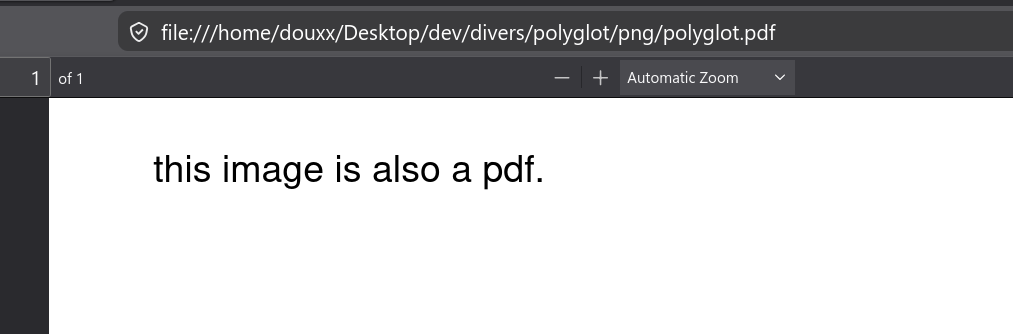
Same file, different extension, different meaning.
The Source

Wanted the source? Here it is — and yes, I obviously had to end this article with one more polyglot.
Download the image above and run:
mkdir -p polyglot; unzip 88dbebf0.jpeg -d polyglot/
ZIP polyglots are actually surprisingly common in the wild. Because the ZIP format reads the file from its end — the central directory sits at the tail of the file, not the head — you can put almost anything before it and ZIP parsers won't care. Self-extracting archives work exactly this way: an executable at the front, a ZIP at the back, a single file that runs and unpacks. Java .jar files are the same trick — a ZIP that happens to also be a valid executable on the JVM.
Every format has slack somewhere. It's just a matter of finding it.
Leonard · 2026-06-04 10:27:34
Continue comme ça douxx
Douxxtech · 2026-06-04 12:55:37
Thanks!